
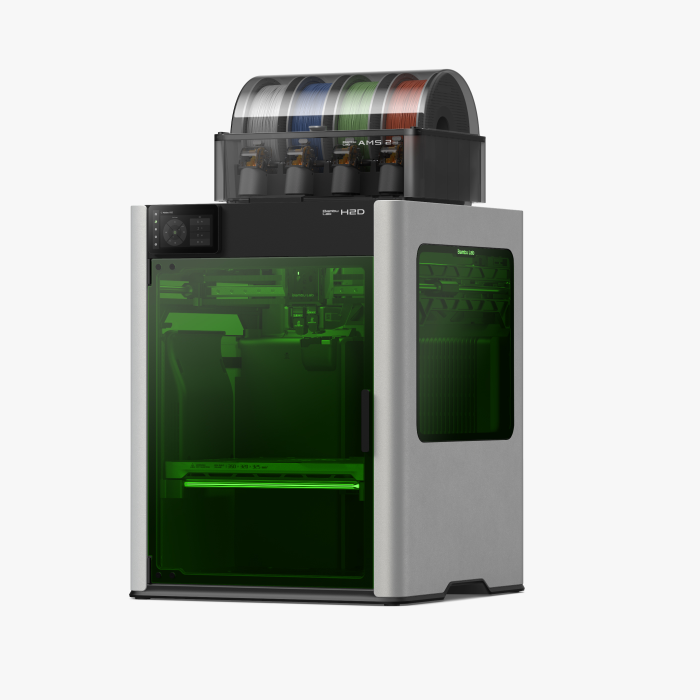
The Bambu Lab H2D is a 3D Printer. 3D printing if a form of additive manufacturing, meaning that the printer builds a 3D model by adding layer-by-layer of melted plastic. The Bambu Lab H2D is a FDM (fused deposition modeling) printer, which uses spools of plastic called filament. This filament is fed into an extruder which heats to 200°C to melt the plastic and create a layer. The filament used in Sam's Lab is called PLA (polylactic acid), a soft biodegradable plastic made from corn byproducts.
The 3D printer can be used to create all sorts of 3D models. Not only is it great for creating fun décor items for around the house, it can be used in the following ways:
- Creating pot planters for your succulents
- Printing replacement parts for board games or broken items around the house
- Prototyping parts and testing functionality
- Printing cosplay items
- Creating custom accessibility tools like food and soda can openers
- A Bambu Lab H2D with AMS
- PLA filament: $0.10/gram with a $1.00 minimum
- Color selection: Red, Orange, Yellow, Green, Blue, Purple, Pink, Silver, Gold, Black, and White
- A 3D design file:
- Single color files can be in STL (.stl), OBJ (.obj), or 3MF (.3mf) format
- Multi-color files must be 3MF (.3mf) format. Maximum of 4 colors per file depending on print time.
- Where to find pre-made 3D design files:
- MakerWorld by Bambu Labs
- Printables by Prusa
- Thingiverse by MyMiniFactory
- Where to make custom designs:
To protect the equipment, the 3D printer is operated by staff only. Patrons can submit a 3D print request for staff to print on their behalf.
- Find or create a 3D model. At this time, the Creative Studio does not have a 3D scanner to replicate physical items or software that can convert images into 3D models.
- Accedpted file formats include STL (.stl), OBJ (.obj), and 3MF (.3mf).
- Find free 3D models at MakerWorld, Printables, or Thingiverse.
- TinkerCad and MakerLab are free, web-based 3D designing apps.
- Submit a 3D print request below.
- Staff will contact you when your item is ready to pick up. Patrons can pick up and pay for their item at the Guest Services Desk at the entrance. Please allow 1-2 weeks for staff to complete your item.
- Printing is $0.10/gram with a $1.00 minimum. Most prints are under $10.
Multi-color printing coming soon in May!
Print requests for multi-color printing must be in 3MF (.3mf) format and your model must be multi-color when submitted. Staff are unable to adjust colors for patron's project.
Two ways to find or create multi-color 3MF files:
- MakerWorld has pre-made multi-color prints. These files must be downloaded as 3MF files to save the color data.
- Bambu Studio has a "Color Painting" feature. 3D models in 3MF, STL, or OBJ format can be opened in Bambu Studio and adjusted for multi-color printing. Bambu Studio is free to download and is avialable on Sam's Lab laptops.
- Read Bambu Lab's Wiki about color painting
Things to consider:
- The Bambu Lab H2D supports up to 4 colors. Your 3MF file must not have more than 4 colors.
- The Bambu Lab H2D automatically changes the color as it prints. This slows down the printer and wastes filament.
- Multi-color prints must still fit a 5-hour print time.
- You will be charged for the wasted filament used for color changes. Bambu Studio provides an estimate.
- Follow tutorials on TinkerCad to learn the basics of 3D designing
- Visit Bambu Lab's Wiki or MakerWorld website to get project ideas or learn about 3D printing
- Learn more about the latest technology in 3D Designing and Printing from MatterHackers
- Find project ideas and tutorials on Instructables
Read Our Handouts
| Title | Date | File |
|---|---|---|
| How To: 3D Print | View Document | |
| How To: Cricut Maker HTV | View Document | |
| How To: Cricut Maker Vinyl | View Document | |
| How To: Silhouette Cameo HTV | View Document | |
| How To: Sublimate Print on Fabric | View Document |
Craft & Maker Databases
Craft & Hobby

CreativeBug

Fiero Code

Self-paced learn-to-code software for kids ages 8-18. Contains hundreds of coding tutorials and dozens of real-world projects.